From idea to the App Store: what really happens during turnkey mobile app development
For many entrepreneurs, mobile app development looks roughly like this:
“We describe the idea. A team of programmers writes the code. A few months later the finished app appears on the App Store and Google Play.”
In practice, there are dozens of stages between the idea and the published product.
If even one of them is skipped, the project can run into serious problems.
You can end up with a beautiful interface that no one understands.
You can build a functional product that can't be scaled.
You can spend the budget on features that users don't need.
You can develop an app but fail to prepare it for real-world load.
That is why turnkey mobile app development is not just programming.
It is the creation of a full-fledged digital product by the professionals of the Webstick team mobile app development .
Step one: the idea has to become a clear objective
The phrase:
“We want an app like Uber”
or:
“We need a marketplace”
is not a technical specification.
At the start you need to understand:
who the user is;
what problem they are solving;
how they solve it now;
why the existing solutions aren't good enough;
what outcome the business needs to achieve.
For example, a “delivery app” can mean completely different products.
It could be:
a customer app;
a courier app;
a restaurant app;
an admin panel;
a routing system;
an order management system;
a settlement system.
So the team's first task is to turn the idea into a product structure.
Step two: research and shaping the concept
Before design and development, you need to understand how the app will work.
The following are created:
user scenarios;
user roles;
a feature map;
the navigation logic;
the data structure;
the core business processes.
For example, in a booking service you need to define:
who creates the service;
who searches for it;
how a booking is made;
who confirms the order;
how payment is processed;
what happens in the event of a cancellation;
which notifications the user receives.
Each of these questions affects the product's architecture.
Step three: MVP
One of the hardest tasks is to understand what you should not build right away.
An entrepreneur often wants to include everything in the first version:
a loyalty program;
ratings;
a chat;
recommendations;
social features;
complex analytics;
dozens of integrations.
But the first version has to answer the main question:
“Does the core business hypothesis work?”
If the app solves one key problem, that may be enough for the first launch.
An MVP lets you:
test the idea faster;
get real feedback;
understand user behavior;
reduce risks;
avoid investing right away in functionality no one needs.
Step four: UX
The user doesn't think about the backend.
They think:
“How can I do this faster?”
UX design is responsible for the logic of the interaction.
You need to understand:
where the user ends up after launching the app;
how they will find the feature they need;
which actions are the main ones;
where an error might occur;
which steps can be removed.
Good UX often means not adding features, but removing them.
The fewer unnecessary actions are required to reach the result, the higher the chance that the user will complete the scenario.
Step five: UI design
After the logic, the visual system is created.
The following are defined:
colors;
typography;
components;
buttons;
forms;
cards;
error states;
empty states;
loading screens;
animations.
It is important to understand: mobile app design is not just about beautiful images.
It has to account for:
screen size;
the specifics of different platforms;
ease of use with a finger;
accessibility;
contrast;
how quickly information is perceived.
Step six: architecture
This is the stage the user never sees.
But this is exactly where the foundation of the product is laid.
The architecture defines:
how the app communicates with the server;
where data is stored;
how authentication works;
how errors are handled;
how the system will scale;
how new features will be added.
Poor architecture may let you build the first version quickly.
But a year later, adding each new feature turns into a problem.
Good architecture allows the product to grow.
Step seven: backend
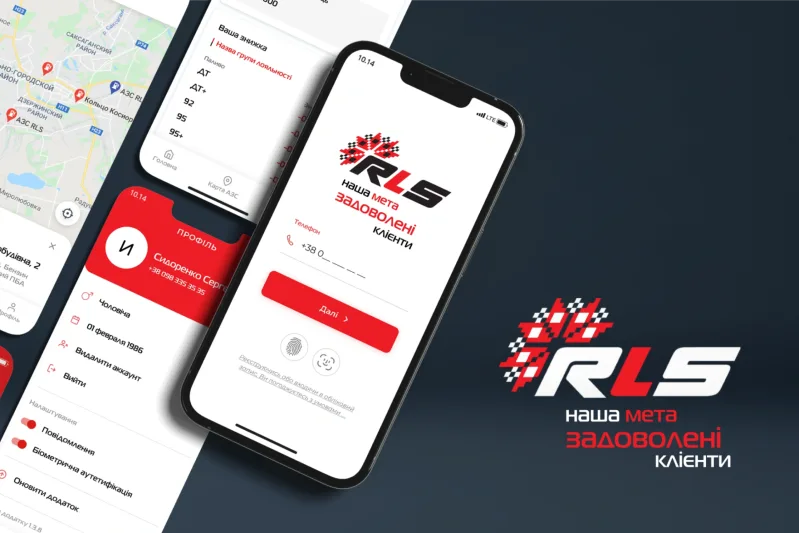
A mobile app is just an interface — for example, as in the app the RLS gas station app case study .
Behind it there is usually a large system.
The backend can be responsible for:
users;
orders;
payments;
catalogs;
roles;
subscriptions;
notifications;
analytics;
integrations.
For example, a user taps the “Place order” button.
On the screen, a single action takes place.
But internally the system has to:
verify the user;
check product availability;
calculate the cost;
create the order;
initiate payment;
send a notification;
update the status;
pass the information to other participants in the process.
That is why a mobile app cannot be considered separately from the backend system.
Step eight: integrations
A modern app rarely exists in isolation.
It may interact with:
payment systems;
CRM;
ERP;
maps;
analytics systems;
authentication services;
email platforms;
SMS providers;
external APIs;
devices.
Each integration adds requirements to the architecture and to testing.
Step nine: development
After the requirements, design, and architecture are prepared, coding begins.
But professional development is not a process where:
“The programmers disappear for three months and come back with a finished app.”
The work should happen in iterations.
A part of the functionality is built.
It is tested.
It is demonstrated to the client.
The team gets feedback.
After that, it moves on.
This helps avoid the situation where, a few months in, it turns out the product was built differently from what the business expected.
Step ten: testing
An app may work on one phone and fail to work correctly on another.
That is why the following are tested:
different screen sizes;
operating system versions;
authentication;
payments;
push notifications;
an unstable internet connection;
user errors;
password recovery;
performance;
security.
Testing should check not only the question:
“Does the feature work?”
but also:
“What happens if the user does something unexpected?”
Because real users always do something unexpected.
Step eleven: publishing on the App Store and Google Play
A finished app does not yet mean it is immediately available to millions of users.
You need to:
prepare release builds;
create developer accounts;
prepare descriptions;
upload screenshots;
configure age ratings;
prepare a privacy policy;
pass the platforms' review.
After publishing, the work doesn't end.
On the contrary — the most important stage begins.
What happens after launch?
After the release, you need to analyze:
the number of downloads;
user activity;
conversion;
drop-offs;
popular features;
bugs;
reviews.
The data shows how people actually use the product.
Sometimes a feature the team spent months on is barely used.
And a simple feature that was considered secondary becomes the main reason users come back.
That is why a mobile app is a living product.
Turnkey development: what it means in practice
When a company orders turnkey mobile app development, it gets more than just code.
The full process can include:
idea analysis;
business analysis;
design;
UX/UI design;
mobile frontend development;
backend;
API;
integrations;
testing;
DevOps;
publishing;
technical support;
further development.
It is precisely this comprehensive approach that makes it possible to create not just working apps, but digital products ready for real use and scaling.
Conclusion
The path from idea to the App Store or Google Play is far more complex than it seems at first glance.
A successful mobile app is the result of work by more than just programmers.
It is a combination of:
business analysis;
product strategy;
UX/UI;
mobile development;
backend;
testing;
infrastructure;
analytics.
At Webstick, we build turnkey mobile apps mobile app development — from the very first idea and design through launch and the product's further development.
If you have a mobile app idea, you don't have to turn it into a huge technical specification straight away.
First you need to understand what problem the product solves, who it is being built for, and how it can be validated with real users as quickly as possible.
And only after that — build the technology that will help this idea become a full-fledged digital product.